
A family checklist for deciding whether a parent who lives alone needs a medical alert system, which type fits their day, what to ask about monitoring, fall detection, batteries and cost, and how to test one during a 30-day trial.

For adult children deciding whether a parent who lives alone needs a medical alert system, which type fits their life, and how to test one before you commit.
Educational information only. This guide is not medical, legal, or financial advice, and it does not rate or rank any company. Talk with your parent's doctor, occupational therapist, or care team about their specific risks, and read every contract and cancellation policy yourself before you sign up for a service.
Why this question comes up when a parent lives alone
Most families start thinking about a medical alert system after a scare: a fall, a dizzy spell, a missed phone call that turned into an hour of worry. The worry is reasonable. According to the CDC, more than one in four adults age 65 and older falls each year, and less than half of them tell their doctor. Falling once doubles the chance of falling again.
When someone lives alone, the fall itself is only part of the risk. The other part is how long it takes for anyone to know. The National Institute on Aging (NIA) advises that if you fall and can't get up, you should call 911 or ask someone for help, and if you're alone, get into a comfortable position and wait for help to arrive. That's why NIA suggests keeping a well-charged cordless or mobile phone on you at all times, arranging daily contact with a family member or friend, and considering an emergency response system.
A geriatrician quoted by AARP puts the stakes plainly: the last thing you want is for an older person to be on the floor for an extended period of time. Beyond the fear, lying on the floor for a long time can lead to serious medical problems.
A medical alert system is one way to shorten that time. It isn't the only way, and it isn't right for everyone. This checklist helps you decide what your parent actually needs, what is likely overkill, and how to try a system before you're locked in.
Already working on the house itself? Our Senior Home Safety and Fall Prevention Checklist and Bathroom Fall Prevention for Aging Parents cover preventing falls. This guide is about what happens after something goes wrong and nobody else is home.
What a medical alert system is (and what it's called)
You'll see several names for the same idea: medical alert system, personal emergency response system (PERS), medical emergency response system, help button, or fall monitor. If you're asking an insurance plan, Medicaid office, or Area Agency on Aging whether they help pay, use the term personal emergency response system or PERS.
The classic setup, as the Federal Trade Commission describes it, has three parts:
- A help button your parent wears or carries, usually as a pendant, wristband, or clip.
- A base unit (console or hub) in the home that the button signals. It connects through a landline or a cellular network and often has a speaker so your parent can talk to someone.
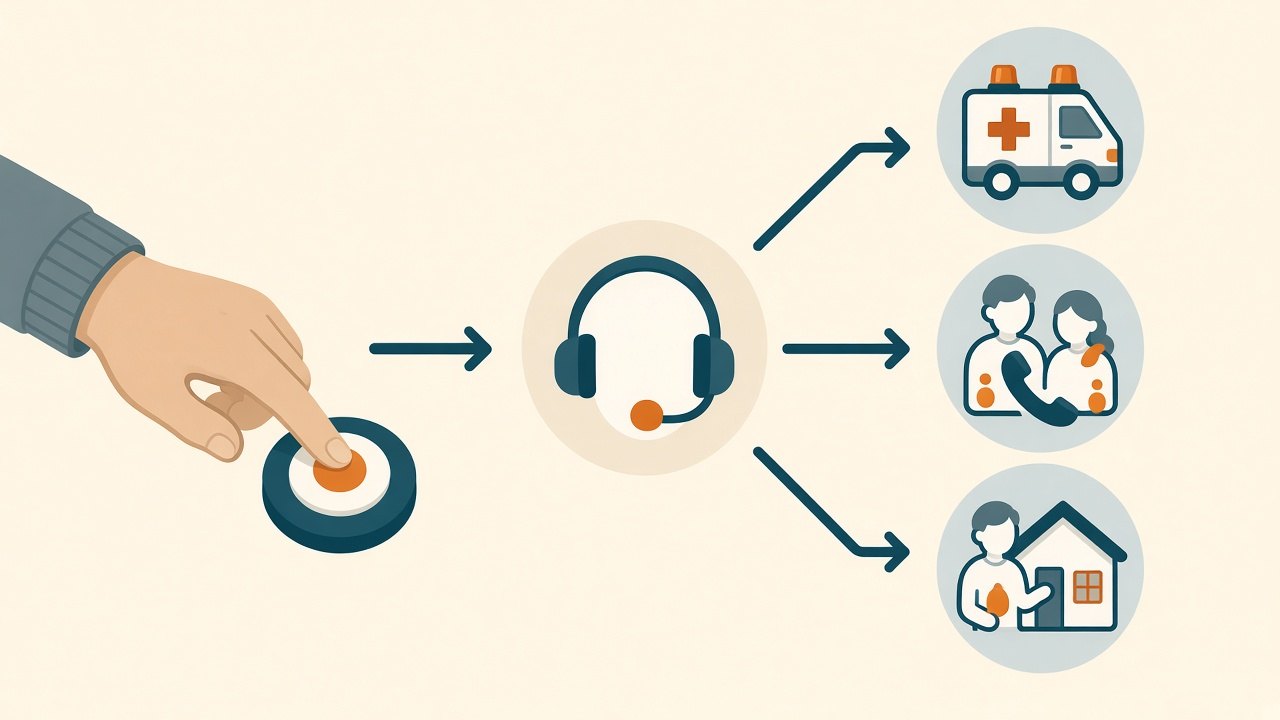
- A response center that answers the alert, talks with your parent, and calls emergency services, family, or a neighbor depending on what's wrong.
Newer systems add or replace parts of that picture. AARP's caregiving guide lists the main options families now see:
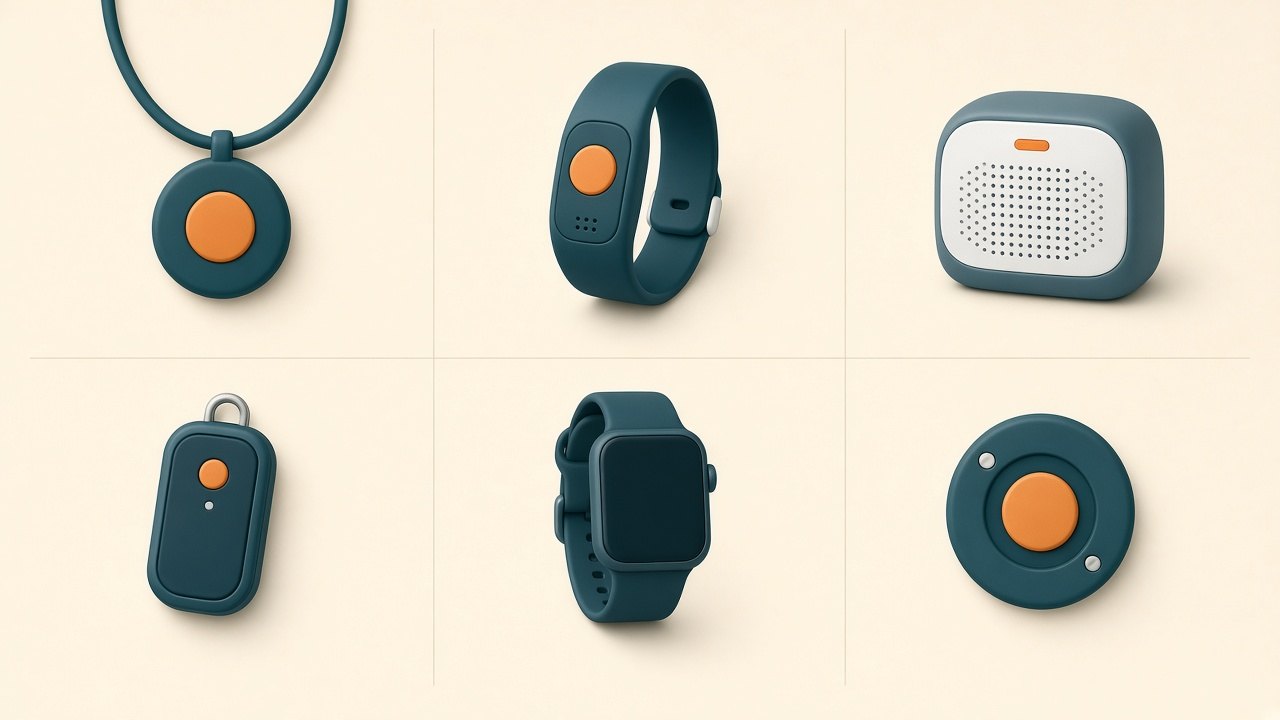
| Type | What it does | Often a fit when | Watch for |
|---|---|---|---|
| In-home base + wearable button | Button signals a base unit in the home, which connects to a response center | Your parent spends most of the day at home | Range limits in the yard, garage, or mailbox; whether the base needs a landline |
| Mobile (on-the-go) unit with GPS | A wearable or carried device with its own cellular connection and location | Your parent still walks, drives, shops, or travels | Charging routine; cellular coverage where they actually go |
| Smartwatch with emergency calling | A watch that can call for help and, on some models, detect falls | Your parent already likes and wears a watch | Battery life, setup, whether calls go to a response center or only to 911 or contacts |
| Wall or table help buttons | Fixed buttons in places like the bathroom or beside the bed | Your parent takes a wearable off to shower or sleep | They only help if your parent can reach them |
| Passive fall detection sensors | Wall- or ceiling-mounted sensors that detect a fall without anything worn | Your parent won't wear a device | Coverage room by room; privacy expectations |
| Smart speakers and phones | Voice- or button-activated calls to contacts or 911 | Your parent is comfortable with the technology and usually unmonitored | Usually no live agent; your parent must be able to speak or reach the phone |
AARP also draws an important line between two kinds of systems. Monitored systems connect to a call center where a live agent can talk with your parent, assess what's happening, and contact family or emergency services. Unmonitored systems, such as some smart speakers, call 911 or designated contacts directly. We'll come back to that choice below.
Step 1: Decide whether your parent needs one at all
Not every older adult who lives alone needs a paid monitoring service. NIA lists simpler options alongside emergency response systems: a well-charged phone your parent carries from room to room, close friends and family on speed dial, a smart speaker that can call contacts, and smartwatches that can make emergency calls or detect fall-like movements.
Use these questions to sort out where your parent sits today.
Signs a phone and a daily check-in may be enough, for now
- Your parent reliably carries a charged phone, including to the bathroom and at night.
- Someone talks with them every day at a predictable time, and the family has a plan if they don't answer.
- They have no recent falls, fainting, or dizzy spells, and no new diagnosis that changes that.
- A neighbor or nearby relative could get inside quickly if needed.
Signs a medical alert system is worth a serious look
- They've fallen in the past year, or have had near-falls they mention only later.
- They take medicines that cause dizziness, or have conditions their doctor says raise the risk of falls or sudden illness.
- They often leave the phone in another room, or can't use it easily.
- They're recovering from a hospital stay or surgery. (Our hospital discharge planning checklist covers the first days home.)
- Family lives far away, and a missed call means hours before anyone checks.
- They have memory changes. NIA's guidance for people living alone with early-stage dementia suggests talking with a doctor or social worker about fall monitors, emergency call buttons, and GPS tracking. See also our dementia wandering safety plan.
Step 2: Match the setup to their actual day (enough vs. overkill)
The most common mistake is buying for the worst-case version of your parent instead of the person who actually lives in the house. Features cost money every month, and every extra device is one more thing to charge, wear, and troubleshoot. Start with the smallest setup that covers the real risks, then add.
| If your parent... | A setup that may be enough | Likely overkill for now |
|---|---|---|
| Stays home most days and rarely goes out alone | In-home base with a waterproof wearable button | Mobile GPS unit they will never take outside |
| Walks the neighborhood, drives, or runs errands alone | Mobile unit with GPS, worn at home too | A second in-home system on top of a mobile unit that already works at home |
| Has fallen, faints, or gets dizzy on standing | A wearable with automatic fall detection, plus the habit of pressing the button anyway | Cameras in every room |
| Takes the pendant off in the shower or at night | A waterproof wearable, or a fixed button in the bathroom and by the bed | Replacing the whole system before trying a different wearable style |
| Refuses to wear anything | Passive sensors in the rooms where falls are likeliest, or fixed buttons | A wearable that will live in a drawer |
| Already loves their smartwatch | Their watch's emergency features, set up and tested with them | A separate pendant they won't put on |
| Has memory loss and may get lost | GPS location plus caregiver alerts, chosen with their doctor | Features they can't learn or remember to use |
A few questions separate "useful" from "nice-sounding":
- Where do falls or emergencies realistically happen? AARP notes that many falls happen in the bathroom and kitchen, so a waterproof device that can be worn in the shower matters more than most add-ons.
- Will your parent wear it all day? A pendant in a dresser drawer protects no one. Comfort and looks matter.
- Does your parent go out alone? If not, GPS is usually an expense without a purpose.
- Who will handle charging? Every mobile unit and watch needs a charging routine your parent can keep.
Step 3: Talk it through with your parent, not around them
A medical alert system only works if the person wearing it agrees to wear it. Many older adults resist because the device feels like a label. Lead with independence: this is about being able to live alone longer, on their terms.
Questions to ask your parent:
- What worries you most about being home alone, if anything?
- Have you ever fallen, slipped, or felt faint and not told anyone?
- Where in the house do you feel least steady?
- Do you carry your phone around the house? At night? In the bathroom?
- Would you wear something on your wrist, around your neck, or clipped on? What would you never wear?
- Who would you want called first: a family member, a neighbor, or straight to 911?
- How do you feel about a stranger at a response center talking to you through a speaker?
- Are you comfortable with family being able to see your location or get alerts?
- Can you hear a speaker clearly across the room? (If hearing is a challenge, see our guides to captioned phones and relay services and hearing loss and safety.)
AARP suggests also asking practical questions about ability: How are their fine motor skills? Can they push the button? Can they communicate with a call center if they have hearing loss or trouble speaking? Is the device easy enough for them to charge and troubleshoot?
Write down the answers. They'll decide the type of system more than any feature list.
Step 4: Understand monitoring and who gets called
When your parent presses the button on a monitored system, an agent at the response center answers, usually through the base unit's speaker or the wearable itself. The agent tries to find out what's wrong and then follows the plan on file: call 911, call a family member, call a neighbor, or a combination.
That plan is yours to set. Before you sign up, decide:
- Who is on the contact list, and in what order. Include at least one person who lives close enough to get there.
- What the agent should do if your parent can't answer. Most families want emergency services sent.
- What medical information is on file. Medications, allergies, conditions, and doctor contacts. Our emergency binder for aging parents helps you gather it.
Questions to ask the company about its response center, drawn from FTC and AARP guidance:
- Is the monitoring center staffed 24 hours a day, 7 days a week?
- What is the average response time?
- What training do the agents receive?
- Does the company run its own response center, or contract with another company? Is the center certified by an organization such as UL Solutions?
- Can agents speak with your parent in their preferred language?
- How does the company test the system in the home, and how often?
- Will family be notified if there's a problem with the system, not just an emergency?
If you choose an unmonitored option, such as a smartwatch or speaker that calls family or 911 directly, there's no agent in the middle. That can work if your contacts reliably answer and your parent can speak clearly. Ask yourself honestly: if the call comes at 3 a.m., who picks up?
Step 5: Think carefully about fall detection
Automatic fall detection is designed to call for help without anyone pressing a button. AARP notes this matters because pressing a button may be impossible when someone is injured or unconscious. NIA mentions that some smartwatches can detect sudden fall-like movements and automatically call for help.
It's a reasonable add-on for a parent with a history of falls, fainting, or dizziness. But go in with clear expectations:
- No sensor catches every fall. A slow slide from a chair to the floor may not look like a fall to a device. Teach your parent to press the button anyway whenever they're on the floor and need help.
- False alarms happen. AARP points out that accidental button presses are common. Ask how the company handles false alarms, whether there's any charge or penalty, and how your parent cancels one.
- It usually costs extra. Many companies sell fall detection as an add-on. Ask what it adds to the monthly bill.
- It only works if it's worn. Passive wall or ceiling sensors are an alternative for parents who won't wear anything, or a backup in the bathroom, where wearables often come off.
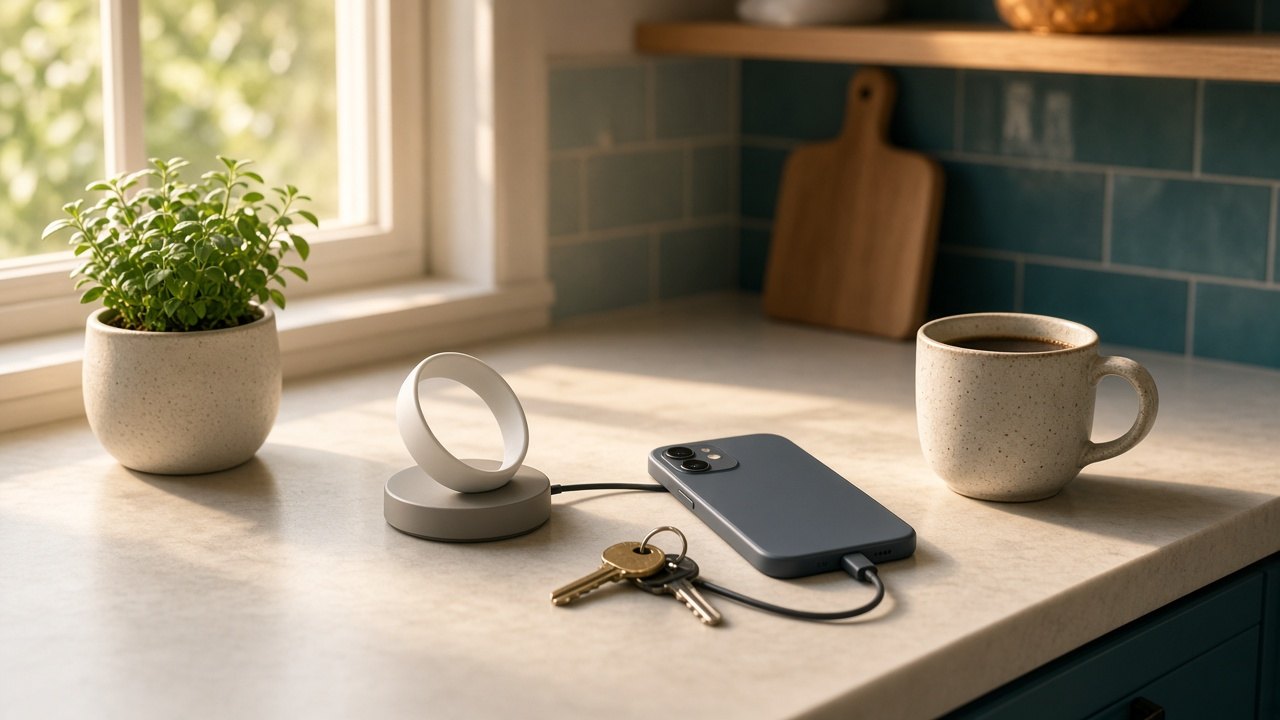
Step 6: Check battery, charging, and connection
A medical alert system fails quietly when the battery dies, the base loses power, or the network it depends on changes. Ask about all three.
Battery and charging
- How long does the wearable or mobile unit last between charges?
- Is there a low-battery alert, and who gets it: your parent, the family, or both?
- Does your parent have to take it off for long stretches to charge it? AARP flags whether a device has to come off at night, when falls are more likely.
- Can charging become part of an existing routine, like the morning coffee or the evening news?
Power and outages
- Does the base unit have a backup battery if the power goes out? How long does it last?
- If your parent relies on other powered medical equipment, fold the alert system into one plan. See our medical device power outage plan.
Connection
- Does the base need a landline, or does it use a cellular connection? AARP suggests checking whether a cellular option is included in case regular phone service is interrupted.
- For mobile units: which cellular networks does it use, and is there coverage where your parent lives and goes?
- Older devices may stop working when networks change. The FCC has warned that when carriers shut down older 3G networks, certain medical devices and other connected products that rely on them can lose service, including devices that use cellular as a backup. If your parent has an older unit, contact the monitoring company to confirm how it connects and whether it still works.
- Test it everywhere. The FTC's shopping checklist says to test the system from every point in and around the home and make sure nothing interferes. Include the bathroom, the basement, the garage, the porch, and the mailbox.
If phone or internet bills are part of the problem, our Lifeline phone and internet support guide explains a federal program that may help eligible households.
Step 7: Understand cost, contracts, and who might help pay
Prices change often, so we don't list them here. Instead, ask every company for a full, written breakdown. AARP suggests asking about:
- The monthly monitoring fee, and whether paying quarterly or annually changes it
- Equipment costs: one-time, included in the monthly fee, or rented
- Activation, setup, or membership fees
- Add-on fees for fall detection, GPS, extra buttons, or a caregiver app
- The cancellation policy, including whether you can pause service during a hospital stay and whether you must return equipment and pay shipping
The FTC also advises reading any purchase, rental, or lease agreement carefully before signing, and paying attention to cancellation clauses that may require a fee. If a salesperson will only share prices during an in-home visit, the FTC suggests considering another company, since in-home sales visits can be high pressure.
Ask for a trial period. AARP recommends looking for a free trial or the ability to cancel for any reason without penalty. Write down the exact last day to cancel and how cancellation must be requested.
Who might help pay
- Original Medicare: NIA notes there is a fee for emergency response systems and that they are usually not covered by insurance. Don't assume Medicare will pay.
- Medicare Advantage: CMS rules allow Medicare Advantage plans to offer an in-home personal emergency response system as a supplemental benefit, as long as it's primarily health related. Plans aren't required to offer it. Call the member services number on your parent's plan card and ask, in these words, whether the plan covers a "personal emergency response system" this year.
- Medicaid: Some state Medicaid programs, including home and community-based services waivers, cover PERS for people who qualify. Washington, D.C.'s Medicaid agency, for example, added PERS coverage under its home health benefit. Rules vary by state, so ask your parent's Medicaid case manager or state office.
- Veterans: AARP suggests veterans ask their VA primary care provider whether they're eligible for a device.
- Local help: Your local Area Agency on Aging may know of programs or providers. Find it through the Eldercare Locator at eldercare.acl.gov or 1-800-677-1116.
- Taxes: AARP notes that if a doctor has recommended a system, it might count as a medical expense. Ask a tax professional before counting on that.
Step 8: Watch for medical alert scams
Medical alert systems are a common pitch in scam calls aimed at older adults. The FTC has brought cases against operations that used robocalls to offer "free" medical alert systems. According to the FTC, those calls falsely claimed a friend or family member had already bought the device, falsely said health organizations such as the National Institute on Aging endorsed it, and told people they wouldn't be charged until the system was activated, when in fact they were charged right away.
Share these rules with your parent:
- No one legitimately "already bought you" a medical alert system without telling you. Call the family member directly to check.
- Hang up on robocalls. The FTC advises hanging up and not pressing any number, even to be removed from the list.
- Never give Medicare, Social Security, bank, or card numbers to an unexpected caller.
- Report it. Report illegal sales calls to the FTC at DoNotCall.gov. If the caller asked for a Medicare number, our Senior Medicare Patrol report guide explains where to report it.
The safest way to buy is for you and your parent to choose a company, look it up, and contact it yourselves. The FTC also suggests checking with your state attorney general, local consumer protection office, and the Better Business Bureau for complaints.
Step 9: Plan how help gets through the door
An alert only gets help to the front door. If your parent can't get up to open it, responders need a way in. AARP suggests three options to explore:
- A lockbox for a house key, with a code the monitoring company can give to emergency responders
- A smart lock that can be opened remotely or with a keypad code
- A residential Knox Box, if your local emergency services offer one, which responders can open with a universal key
Also make sure the house number is visible from the street, and that the contact list on file includes someone with a key. Our emergency preparedness guide for older adults covers the rest of the home emergency plan.
The family trial checklist: the first 30 days
Treat the first month, or the trial window, as a test. At the end, you'll keep the system, change the setup, or cancel before you're charged for something that doesn't fit.
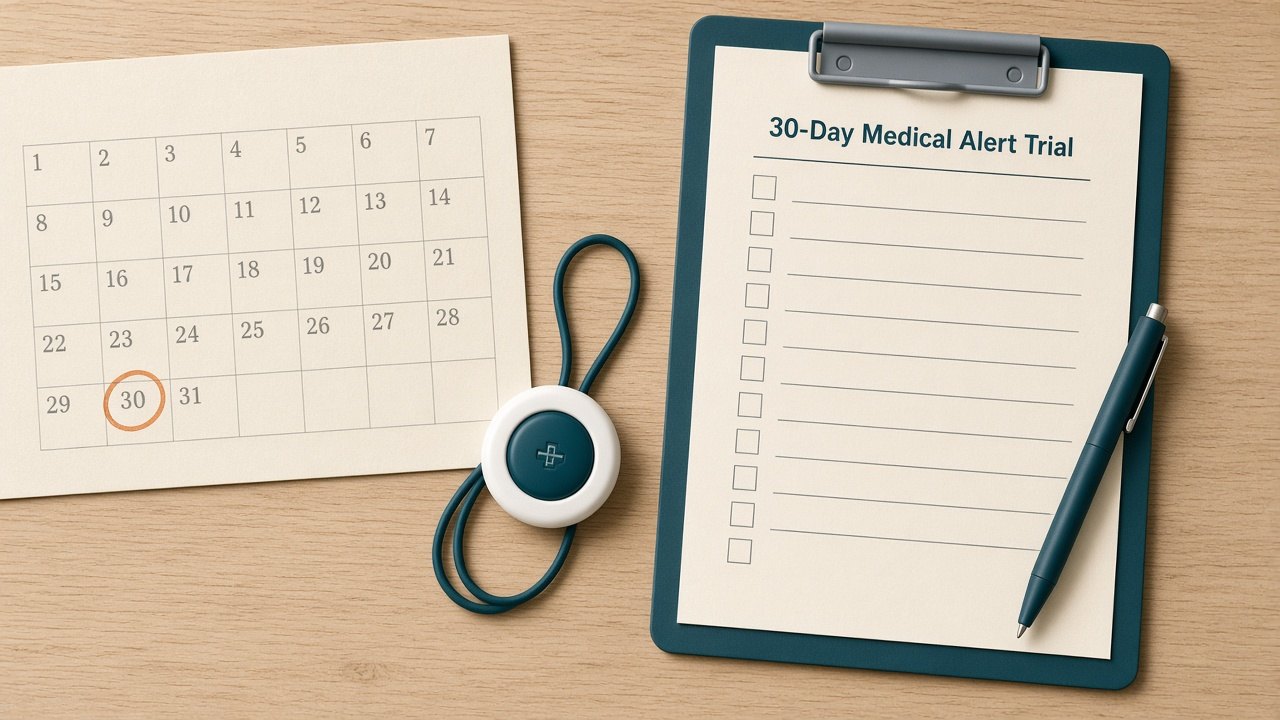
Day 1: Set up together
- Set up the base or charge the device with your parent, not for them.
- Enter the contact list in the order you agreed, and confirm the medical information on file.
- Write the cancellation deadline on the calendar.
Week 1: Test it where life happens
- Place a test call with your parent from each room, the shower, the yard, and the mailbox. Follow the company's instructions for test calls so responders aren't sent.
- Check that your parent can hear the agent and the agent can hear your parent.
- If the system has fall detection, ask the company how to test it safely.
- Practice the "I'm on the floor" plan: press the button, stay calm, wait for help.
Week 2: Check the daily habits
- Is your parent wearing it all day, including in the bathroom?
- Is the charging routine working? Did any low-battery alerts arrive, and to whom?
- Have there been false alarms? How were they handled?
Week 3: Check the family side
- Did every contact on the list get any test or alert calls they expected?
- Does the caregiver app (if any) show what you need, without overwhelming anyone?
- Does your parent feel watched, or safer? Ask directly.
Week 4: Decide
- Review the first bill line by line against what you were quoted.
- Keep, adjust (different wearable, add or remove fall detection or GPS), or cancel before the deadline.
- Set a reminder to review the setup every few months, and after any fall, hospital stay, or change in health.
What a medical alert system can't do
A help button shortens the time to help. It doesn't prevent falls, catch every emergency, or replace people. Keep the other pieces in place:
- Daily contact. NIA recommends arranging daily contact with family or a friend. A medical alert is not a substitute for someone noticing your parent seems "off." Our guide to social isolation in retirement has ideas for steady check-ins.
- Fall prevention. Talk with your parent's doctor about fall risk, medicines, vision, and strength and balance. After a fall, our guide to Medicare outpatient therapy after a fall explains how families typically arrange PT and OT.
- A safer home. Grab bars, lighting, and clear paths still matter, especially in the bathroom.
- Honest re-checks. If falls, confusion, or missed meals keep happening, a button may not be enough support for living alone. That's a conversation with the doctor and the family, not a device problem.
Who to call
| Question | Who to contact |
|---|---|
| Fall risk, dizziness, medicines, whether a system is advisable | Your parent's doctor or pharmacist |
| Which device your parent can realistically use | An occupational therapist (ask the doctor for a referral) |
| Whether a Medicare Advantage plan covers PERS | Member services number on the plan card |
| Medicaid or waiver coverage | Your parent's Medicaid case manager or state Medicaid office |
| Veterans' eligibility | Your parent's VA primary care provider |
| Local programs and providers | Eldercare Locator: eldercare.acl.gov or 1-800-677-1116 |
| A suspicious medical alert sales call | FTC at DoNotCall.gov |
| Emergency right now | 911 |
Printable checklist: Medical Alert Decision and Trial
Print this page and work through it together. Educational only.
Decide if it's needed
- ☐ Ask about falls, near-falls, and dizzy spells in the past year
- ☐ Check whether your parent carries a charged phone everywhere, including at night
- ☐ Confirm someone checks in daily, with a plan if there's no answer
- ☐ Ask the doctor whether a medical alert system is advisable
Choose the type
- ☐ Mostly home: in-home base + waterproof wearable
- ☐ Goes out alone: mobile unit with GPS
- ☐ Falls or fainting: ask about automatic fall detection
- ☐ Won't wear anything: fixed buttons or passive sensors
- ☐ Decide: monitored (response center) or unmonitored (calls family or 911)
Ask the company
- ☐ 24/7 monitoring? Average response time? Own or contracted center?
- ☐ Battery life, low-battery alerts, base unit backup battery
- ☐ Landline or cellular? Coverage where your parent lives and goes?
- ☐ Full written price breakdown, including equipment and add-ons
- ☐ Trial period, cancellation terms, equipment return rules
Set up and test
- ☐ Contact list in order; medical information on file
- ☐ Test call from every room, the shower, the yard, and the mailbox
- ☐ Charging spot and routine agreed
- ☐ Key access plan: lockbox, smart lock, or Knox Box
- ☐ Cancellation deadline: ____________
Review
- ☐ First bill matches the quote
- ☐ Keep, adjust, or cancel by the deadline
- ☐ Re-check after any fall, hospital stay, or health change
Key contacts: Doctor ____________ · Response company ____________ · Nearby key holder ____________ · Eldercare Locator 1-800-677-1116
Sources (checked October 27, 2026)
- CDC, Facts About Older Adult Falls: https://www.cdc.gov/falls/data-research/facts-stats/index.html
- National Institute on Aging, Falls and Fractures in Older Adults: Causes and Prevention: https://www.nia.nih.gov/health/falls-and-falls-prevention/falls-and-fractures-older-adults-causes-and-prevention
- National Institute on Aging, Preventing Falls at Home: Room by Room: https://www.nia.nih.gov/health/falls-and-falls-prevention/preventing-falls-home-room-room
- National Institute on Aging, Aging in Place: Growing Older at Home: https://www.nia.nih.gov/health/aging-place/aging-place-growing-older-home
- National Institute on Aging, Tips for Living Alone With Early-Stage Dementia: https://www.nia.nih.gov/health/alzheimers-and-dementia/tips-living-alone-early-stage-dementia
- AARP Caregiving, guide to personal emergency response systems (Amy Goyer, updated May 29, 2026): https://www.aarp.org/caregiving/home-care/medic-alert-systems-options/
- Federal Trade Commission, Facts for Consumers: Personal Emergency Response Systems (via GovInfo): https://www.govinfo.gov/content/pkg/GOVPUB-FT-PURL-LPS85509/pdf/GOVPUB-FT-PURL-LPS85509.pdf
- Federal Trade Commission, FTC and Florida Attorney General sue to stop deceptive robocalls pitching "free" medical alert systems (2015): https://www.ftc.gov/news-events/news/press-releases/2015/07/ftc-florida-attorney-general-sue-stop-deceptive-robocalls-operation-pitched-seniors-free-medical
- Federal Trade Commission, Settlement stops operations that used robocalls to pitch medical alert devices (2014): https://www.ftc.gov/news-events/news/press-releases/2014/11/settlement-ftc-florida-attorney-general-stops-operations-used-robocalls-fraudulently-pitch-medical
- FTC Consumer Advice, Robocalls: https://consumer.ftc.gov/articles/robocalls
- FCC, Plan Ahead for Phase Out of 3G Cellular Networks and Service: https://www.fcc.gov/consumers/guides/plan-ahead-phase-out-3g-cellular-networks-and-service
- CMS, Medicare Managed Care Manual, Chapter 4 (Personal Emergency Response System as a supplemental benefit): https://www.cms.gov/regulations-and-guidance/guidance/manuals/downloads/mc86c04.pdf
- DC Department of Health Care Finance, Transmittal 20-35 (Medicaid coverage of PERS): https://dhcf.dc.gov/publication/transmittal-20-35-reimbursement-medical-equipment-supplies-and-appliances
- National Do Not Call Registry: https://www.donotcall.gov/
- Eldercare Locator (Administration for Community Living): https://eldercare.acl.gov/
Educational information only; not medical, legal, or financial advice. YouRetire does not rank medical alert companies.
Keep Reading
Related guides in Senior Safety
Trusted Help
Trusted Social Security and legal help
If this decision affects Social Security benefits, paperwork, or authority to act for someone else, confirm the next step with the program or a qualified legal professional.
Use these links to verify eligibility, coverage, state rules, or local services before making a personal medical, legal, or financial decision.